
Support
How can we help?
Answers to common questions, what each permission is for, and how to keep a backup of your data.
FAQ
Questions
Is Winaruz free?
Yes. Winaruz is free to install, and every tool works on the free plan, with no account. Your first 14 days include every Pro option. After that, some tools cap how many items you add, like 10 open tasks, 50 notes or 10 blocked sites, and Pro options turn off. Nothing you made is deleted, items over a cap keep working, and two-step codes always show. The Password Manager and Calendar have no cap. Winaruz Pro removes the caps.
How much is Winaruz Pro?
Winaruz Pro is $24, one time. It is one payment, with no subscription, and works on up to 3 devices. It removes every cap and turns on all Pro options, like autofill, strict mode, offline reading and your own AI key. Your key arrives by email right after you pay. Refunds within 14 days.
Can I keep different tools for work and for home?
Yes, with profiles. A profile picks which of your tools show and has its own Home, so a Focus profile can show only your work tools. Switch and manage them in Your data, the round button at the top of Home. Your data is the same in every profile. The free plan holds 2 profiles; Winaruz Pro removes the cap.
Where is my data saved?
In your browser, on your device. Tasks, notes, settings and your Home layout live in Chrome's extension storage. Screenshots and recordings stay in the browser's local database. There is no Winaruz server that keeps a copy.
Does Winaruz need an internet connection?
Most tools work offline. A few fetch public data when you use them: Weather and city search (Open-Meteo), Currency Converter (ExchangeRate-API), Timestamp Saver thumbnails (YouTube), the Islam tools (AlAdhan, AlQuran Cloud, EveryAyah), calendars you subscribe to by link, and the Winaruz Pro license check (our website, only the license details). With Winaruz Pro and your own key, Ask AI sends your messages to the provider you picked (Anthropic, OpenAI, Google or OpenRouter), and Translator can send the text you translate to DeepL or Google Cloud Translation. Everything else receives only a city, coordinates or the request itself, never your saved content.
Why does a tool ask for a permission?
Tools that read your tabs, pages or browser data ask only for what they need, the first time you open them. The Tab Manager needs to see your tabs, the Screen Capture needs access to the page you capture. You can take any permission back in Settings, Permissions.
Do I have to use every tool?
No. Pick a starter pack on first run, then add or remove tools any time from the Market. Tools you don't install stay out of your way.
How do I move my data to another device?
Open Your data (from Settings or the Home header) and tap Export to save a backup file. On the other device, install Winaruz, open Your data and tap Import to restore it.
Does the AI send my prompts to a server?
Not by default. Ask AI and Translator use the models built into Chrome, so your text stays in the browser on your device. With Winaruz Pro you can add your own API key: your messages then go straight from your browser to the provider you picked (Anthropic, OpenAI, Google, OpenRouter, DeepL or Google Translate), never through us.
Which browsers are supported?
Winaruz is made for Google Chrome on desktop. It may run on other Chromium browsers, but some tools, like the on-device AI, need Chrome.
What happens if I forget my Password Manager master password?
It cannot be recovered. The Password Manager is encrypted with your master password and nobody else has it, so keep it somewhere safe.
How do I open Winaruz quickly?
Click the Winaruz icon in the toolbar (pin it from the puzzle menu first). Inside, press Ctrl K (⌘K on Mac) to search every tool, task and note.
Permissions
Why Winaruz asks for permissions
Winaruz installs with a few basic permissions: storage, notifications and timers, site icons, the side panel, a right-click menu, and a background page that plays sounds and reads the clipboard. Your location is never asked at install: Weather and Qibla ask through the browser's location prompt, only when you turn on "Use my location". Everything else is optional: a tool asks for what it needs the first time you open it, and you can take it back any time in Settings, Permissions.
-
Show notifications
notificationsRing alarms and reminders, even when this window is closed.
Used by
- Alarm
- Pomodoro
- Timer
- Tasks
- Calendar
-
Schedule tasks
alarmsWake up at the right time in the background.
Used by
- Alarm
- Pomodoro
- Timer
- Tasks
- Calendar
- Site Time
- backups
-
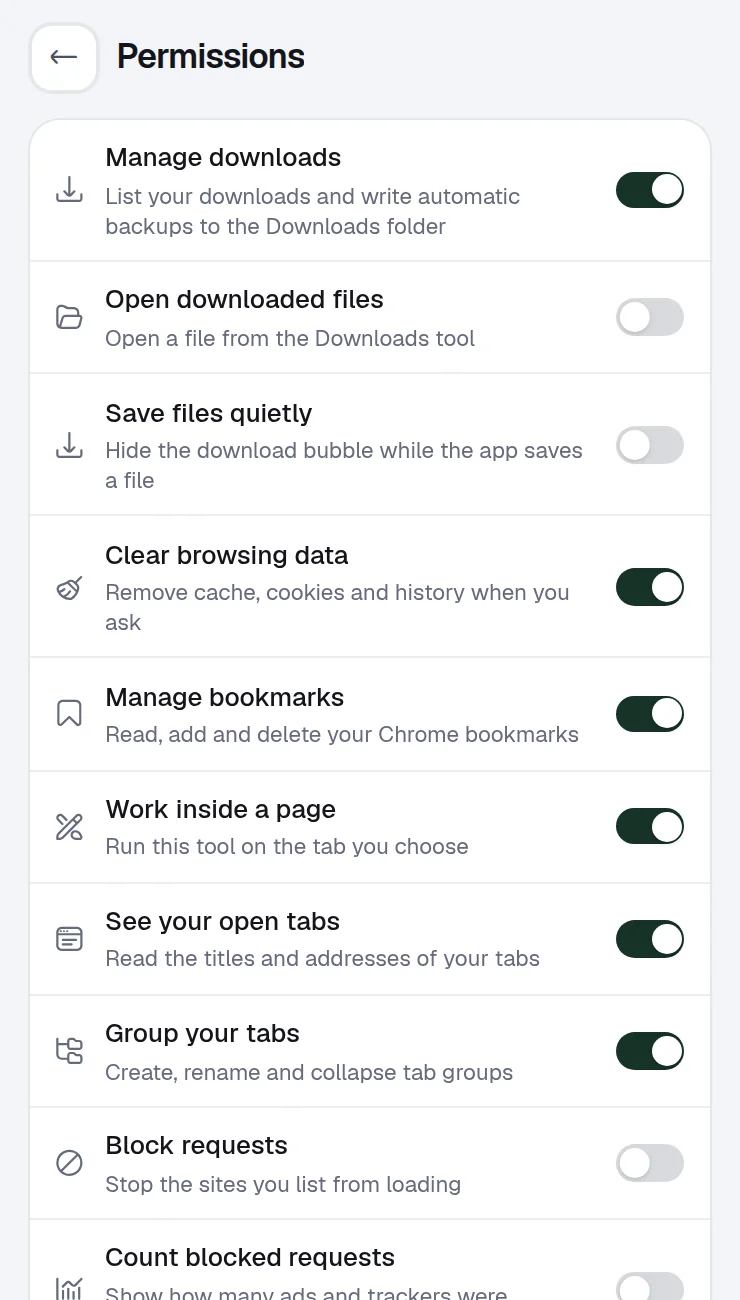
See your open tabs
tabsRead the titles and addresses of your tabs.
Used by
- Tab Manager
- Bookmark Manager
- Cache Cleaner
- Read Later
- Site Time
- Site Blocker
-
Group your tabs
tabGroupsCreate, rename and collapse tab groups.
Used by
- Tab Manager
-
Manage bookmarks
bookmarksRead, add and delete your Chrome bookmarks.
Used by
- Bookmark Manager
-
Clear browsing data
browsingDataRemove cache, cookies and history when you ask.
Used by
- Cache Cleaner
-
Work inside a page
scriptingRun this tool on the tab you choose.
Used by
- Screen Capture
- Screen Doodler
- Clipboard
- Timestamp Saver
- Form Filler
- Tab Manager (tab switcher)
-
Access the current page
<all_urls>Needed to capture, draw on, fill or read the tab you are on.
Used by
- Screen Capture
- Screen Doodler
- Clipboard
- Timestamp Saver
- Form Filler
- Site Blocker
- Tab Manager (tab switcher)
-
Block requests
declarativeNetRequestWithHostAccessStop the sites you list from loading.
Used by
- Site Blocker
-
Count blocked requests
declarativeNetRequestFeedbackShow how many ads and trackers were stopped today.
Used by
- Site Blocker
-
Manage downloads
downloadsList your downloads and write automatic backups to the Downloads folder.
Used by
- Downloads
- backups
-
Open downloaded files
downloads.openOpen a file from the Downloads tool.
Used by
- Downloads
-
Manage extensions
managementList your other extensions and turn them on or off.
Used by
- Extensions
-
Know when you are away
idlePause site time while you are away, and lock the Password Manager when the screen locks.
Used by
- Site Time
- Password Manager
-
Read the clipboard
clipboardReadKeep what you copied, from any tab or app, when you open Winaruz.
Used by
- Clipboard
-
Clear the clipboard
clipboardWriteRemove a copied password after 30 seconds, even when the Winaruz window is in the back.
Used by
- Password Manager
-
See your top sites
topSitesSuggest the sites you visit most as quick links.
Used by
- Quick Links
-
Your location
geolocationNot asked at install. The browser's location prompt shows only when you turn on "Use my location" in Weather or Qibla.
Used by
- Weather
- Qibla
-
Manage site permissions
contentSettingsSee and change what the site in a tab may use, like camera, microphone, location or notifications.
Used by
- Tab Manager
-
Use your microphone
microphoneNot asked at install. Asked on a permission page when you turn on the microphone in Screen Recorder.
Used by
- Screen Recorder
-
Use your camera
cameraNot asked at install. Asked on a permission page when you turn on the camera bubble, which shows on the page you record.
Used by
- Screen Recorder
-
Show site icons
faviconDisplay website icons.
Used by
- Quick Links
-
Open in the side panel
sidePanelShow Winaruz next to the page you are on, when you pick Side panel in Settings.
Used by
- All tools
-
Right-click menu
contextMenusAdd actions for the tools you installed to the right-click menu: Translate, Explain or Save to Notes on selected text, Read later, QR code or Block this site on any page.
Used by
- Notes
- Translator
- Ask AI
- Snippets
- Read Later
- QR Code
- Site Blocker
Backup
Back up and restore
Your data lives in your browser. A backup file is the way to keep it safe or move it to another device.
-
01
Export a backup
Open Winaruz, go to Your data and tap Export. Chrome saves a JSON file with all your tools' data.
-
02
Turn on auto backup
In Your data, switch on Auto backup, choose Daily, Weekly or Monthly, and save to a folder inside Downloads or any folder you pick. It runs in the background, even when the window is closed.
-
03
Restore on any device
Install Winaruz, open Your data, tap Import and choose your backup file. Winaruz asks before it replaces anything.
Clearing extension data, removing Winaruz or losing your browser profile deletes what isn't in a backup.
Still stuck?
Write to us. Tell us your Chrome version and what you tried, and we'll get back to you.